
Explore the top cash flow management tools for small businesses. Compare platforms like Fathom, Spotlight Reporting and Float, and learn how to choose software that makes planning and forecasting simpler.
At a glance
- Cash flow forecasting tools give business owners clearer visibility over their cash position, helping them plan ahead and make confident decisions about day-to-day operations and investing for growth.
- Choices range from simple spreadsheet templates to connected software like Fathom, Spotlight Reporting, Float, and Futrli, each offering different levels of automation, insight, and cost.
- The best option depends on your business size, accounting setup, and how much integration or control you need to manage cash flow effectively.
Running a small business often means keeping a close eye on what’s coming in and what’s going out. From wages and rent to supplier payments and tax obligations, cash flow is what keeps your business moving. But staying on top of it isn’t always easy, especially when payments arrive late or expenses change from month to month.
The right cash flow management software can make that job a lot simpler. These tools help you track, forecast, and understand your cash position so you can make confident decisions about when to restock, bring on new staff, or invest in growth.
In this guide, we explore how cash flow forecasting tools can support your planning, the benefits they offer, and how to choose the one that suits the way your business works.
Why cash flow forecasting tools are useful for small businesses
Understanding your cash flow doesn’t just help you avoid common cash flow mistakes; it makes day-to-day decisions a lot easier. Forecasting tools take what can be a manual and time-consuming job and turn it into a clearer, more reliable part of your planning.
The right software helps you see what’s happening with your cash week by week or month by month. You can prepare for seasonal slowdowns, plan for large expenses, and make informed decisions about when to spend or save. Many owners also find these tools make conversations with lenders or advisors easier because the information is consistent and up to date.
When forecasting relies on guesswork or outdated spreadsheets, small issues can escalate quickly. A late payment, an unexpected bill, or an upcoming tax obligation can put pressure on everything from paying staff to ordering stock. Cash flow tools help you spot these gaps early and adjust before they affect your operations.
If your forecast highlights a shortfall between cash coming in and going out, flexible funding can help you manage that gap. In these situations, a small business loan can support your cash flow and future plans.
The difference between cash flow tools and accounting software
Most accounting platforms, including Xero, MYOB, and QuickBooks Online, now offer some level of cash flow forecasting, although the features vary depending on your plan. Often, these built-in tools provide a short-term view of your finances, which can be enough for day-to-day monitoring.
Dedicated cash flow software goes a step further. It allows you to test different scenarios, model future growth, and see how changes in your business could affect your cash position over time. When comparing options, check which accounting systems they integrate with. Strong integrations keep your forecasts updated automatically, reduce manual work, and help minimise errors.
Cash flow software options
Every business manages cash flow a little differently. Some owners like the flexibility of building their own spreadsheets, while others prefer software that connects to their accounting system and updates automatically. Fortunately, there is a tool to suit every approach: from simple templates that offer full control, to smarter platforms that turn your financial data into clear, real-time insights.
We know you don’t have time to test every platform yourself, so we’ve done the legwork for you. Below, you’ll find a breakdown of five essential cash flow management tools available in New Zealand, compared by the criteria that matter most to business owners. This will help you work out which option fits best, whether you enjoy building your own spreadsheets or want something more automated.
1. Manual Spreadsheets (Google Sheets / Microsoft Excel)
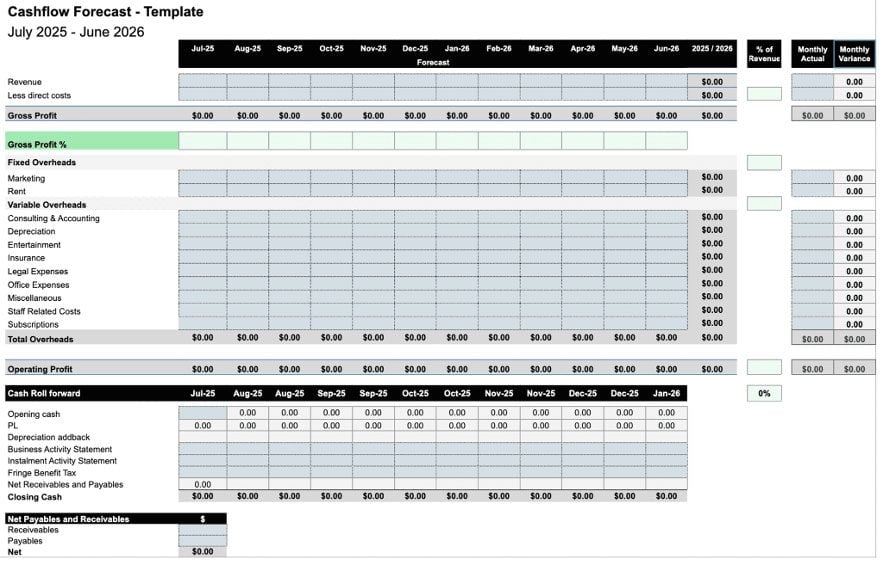
If you’re confident working with numbers, spreadsheets like Microsoft Excel or Google Sheets remain one of the most flexible and cost-effective ways to forecast cash flow. They give you full control over how your data is laid out and make it easy to adjust for your business’s particular income and expense setup.
Many small businesses start with spreadsheets because they are simple, familiar, and often already available through Google Workspace or Microsoft Office. They also show the direct impact of changes such as new hires, pricing shifts, or supplier costs without relying on extra software purchases.
Spreadsheets do need manual updates, but that hands-on approach can be useful for understanding where your money is going and how each line item affects your cash position. For many owners, it’s a practical way to get a handle on the numbers before moving to automated tools.
Free cash flow forecast templateProspa has a free cash flow forecast template based on the same structure accountants use with their small business clients. It is designed to help New Zealand small business owners track income and expenses across a 12-month period. Download the free Excel template and follow these tips in our companion article on how to forecast cash flow for your small business. |
|---|
- Best for: Those who prefer to manage their own finances and want full control and flexibility.
- Ease of use: Easy. As long as you have basic spreadsheet knowledge.
- Integrations: None (manual entry).
- Multi-Currency: Manual.
- Typical cost: Google Sheets – Free. Microsoft 365 Business Basic starts from NZ$7.10 per month (paid annually). Learn more
- Free trial: 30 days.
2. Fathom
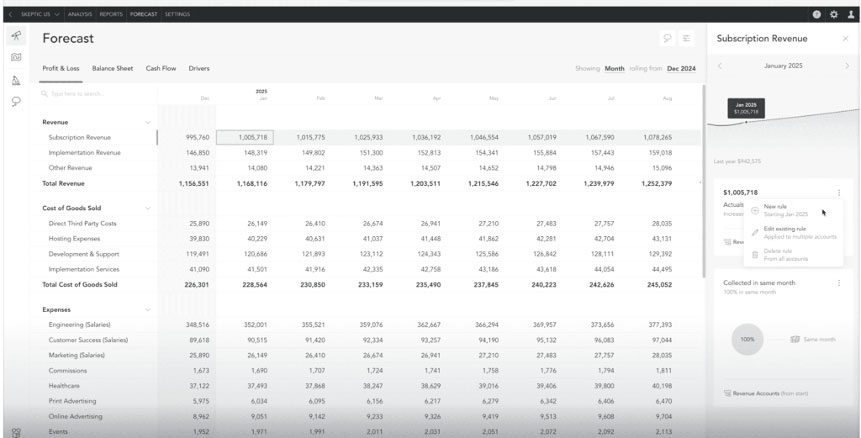
Fathom goes beyond basic forecasting to help you understand your business performance in more detail. Its key strength is combining financial analysis, KPI tracking, and scenario planning in one platform, giving you clearer insight into what’s shaping your cash position.
The platform connects to your accounting software and automatically imports your data to create a three-way forecast that links your profit and loss, balance sheet, and cash flow. This gives you a complete view of how your business is performing and where your cash position may be heading.
Alongside forecasting, Fathom helps you measure progress against goals with detailed KPI dashboards and visual reports that turn complex financial information into insights you can share with your team or accountant. Its scenario modelling tools let you explore how decisions such as adjusting pricing or expanding your team could influence your results over time.
While accountants and advisors often use Fathom, many growing SMEs also use it directly to support planning and strategy discussions. It can take some time to set up, and smaller businesses may find it offers more features than they need day to day.
- Best for: Businesses that want deeper analysis and visual reporting to support long-term planning.
- Ease of use: Moderate. Intuitive once set up, but benefits from some financial knowledge.
- Integrations: Xero, QuickBooks, MYOB, Excel, Google Sheets.
- Multi-Currency: Yes.
- Typical cost: From NZ$65 per month, depending on the number of companies. View pricing
- Free trial: 14 days.
3. Spotlight Reporting
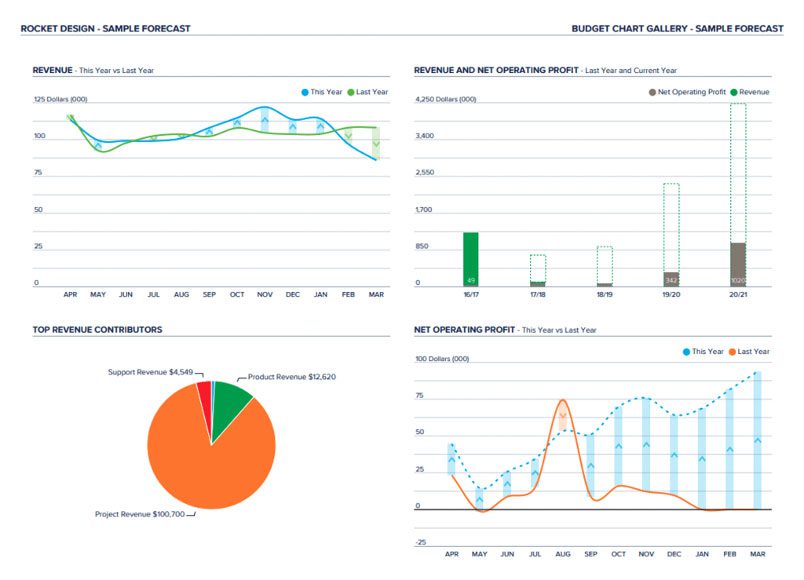
Spotlight Reporting is designed for businesses that need formal, board-ready reports and clear visual dashboards. It transforms your accounting data into easy-to-read charts and summaries, making complex financial information simpler to interpret and share with your accountant, board, or wider team.
Like Fathom, Spotlight produces three-way forecasts that link your profit and loss, balance sheet, and cash flow. However, its real strength lies in consolidation and structured reporting.
Spotlight is particularly helpful for growing businesses or accounting firms that manage multiple entities, as it can consolidate data from several companies into one report. This lets you model different scenarios and prepare comprehensive reports quickly.
- Best for: Businesses that need consolidated reporting or work closely with accountants and advisors.
- Ease of use: Moderate to high. Intuitive interface, though setup can take time.
- Integrations: Xero, QuickBooks, MYOB, Karbon, Excel, Google Sheets, Google Analytics.
- Multi-Currency: Yes.
- Typical cost: From NZ$65 per month.
- Free trial: 14 days.
4. Float
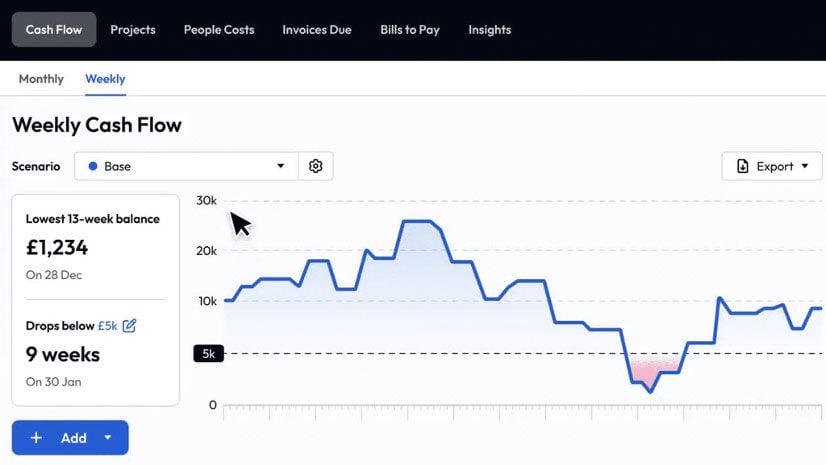
Float is a cloud-based cash flow tool that connects directly to your accounting software, giving you real-time visibility over your business finances. Once it’s set up, it automatically pulls in your invoices, bills, and bank transactions, and updates your forecast as those numbers change.
The platform is designed to be easy to use, with clear charts and simple scenario planning tools that let you test changes before they happen. You can see a live view of your cash position and explore “what if” scenarios, such as hiring a new team member or taking on an extra order. For many small businesses, it’s a straightforward way to stay on top of short-term cash needs without building complex spreadsheets.
Float works best for businesses already using Xero, QuickBooks Online, or FreeAgent. It’s less suitable if you’re used to manual spreadsheets, and your forecasts will only be as accurate as the accounting data flowing into the system. Float’s platform is readily available in New Zealand, although its plans are billed in AUD.
- Best for: Businesses that want automatic forecasting and simple visual reports without building spreadsheets.
- Ease of use: Easy. Designed for non-accountants and easy to learn.
- Integrations: Xero, QuickBooks, FreeAgent.
- Multi-Currency: No.
- Typical cost: Starting from A$39 per month, depending on revenue (paid annually). View pricing
- Free trial: 14 days.
5. Futrli by Sage
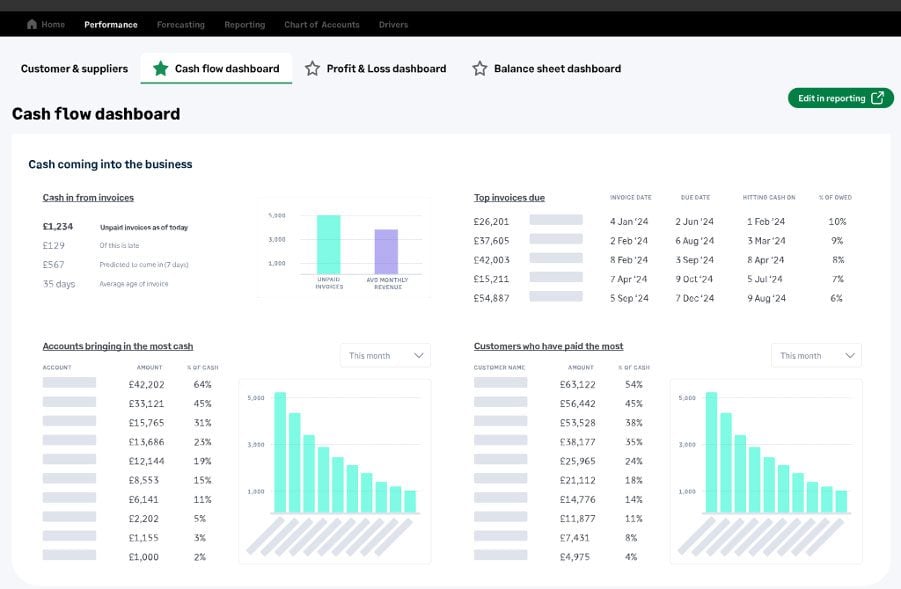
Futrli by Sage gives business owners a clear view of their performance and cash flow in one place. Like the tools above, it also connects with your accounting software to track daily cash flow, forecast future income and expenses, and show how decisions today will affect your profit and balance sheet in the months ahead.
However, the platform stands out for its advanced flexibility and long-range views. You can merge multiple entities, forecast in different currencies, and even model HR changes such as new hires or payroll tax adjustments. Its customisable dashboards and reports make it easy to monitor the metrics that matter most to your business, whether you want a snapshot of cash flow or a longer-term forecast.
Futrli is suited to growing businesses and accountants who need detailed, data-driven forecasts but still want an interface that’s simple to set up and interpret. It’s built for more detailed, long-range planning, and its multi-entity and HR forecasting features make it a strong choice for businesses planning to scale. Again Futrli is also available in New Zealand, although its plans are billed in AUD.
- Best for: Businesses that want detailed forecasting with lots of flexibility.
- Ease of use: Moderate. The dashboards are intuitive, but the advanced features require time to set up and learn.
- Integrations: Sage, Xero, QuickBooks, Excel.
- Multi-Currency: Yes.
- Typical cost: Starting from A$55 per month. View pricing
- Free trial: 14 days.
Cash flow Forecasting Tools Comparison
| Tool | Best for | Ease of use | Integrations | Multi-Currency | Typical Cost | Free trial |
|---|---|---|---|---|---|---|
| Google Sheets / Microsoft Excel | Managing own finances
Control and flexibility |
Easy | None
(manual entry) |
Manual | Google: Free
Excel: from NZ$7.10 pm |
30 days |
| Fathom | Deeper analysis
Visual reports Long-term planning |
Moderate | Xero, QuickBooks,
MYOB, Excel |
Yes | From NZ$65 pm | 14 days |
| Spotlight Reporting | Consolidated reporting
Working with accountants/advisors |
Moderate
to high |
Xero, QuickBooks, MYOB, Karbon, Excel, Google Sheets, Google Analytics | Yes | From NZ$65 pm | 14 days |
| Float | Automatic forecasting
Simple visual reports |
Easy | Xero, QuickBooks, FreeAgent | No | From A$39 pm | 14 days |
| Futrli by Sage | Advanced scenario planning
Detailed long-range forecasting Flexible reporting |
Moderate | Sage, Xero,
QuickBooks, Excel |
Yes | From A$55 pm | 14 days |
| What about CashManager? |
|---|
| While most accounting platforms only provide short-term cash flow views, the popular homegrown NZ solution CashManager stands out with forecasting capabilities that extend into the future.
It is worth noting that while it does forecasting, it’s still not a dedicated cash flow tool, so businesses needing scenario modelling, growth planning, or multi-entity consolidation should still explore the options above. |
Keeping your cash flow in check
Every small business is different, and so are their cash flow needs. What they share is the need to plan ahead and stay in control of money coming in and going out. Whether you like working in spreadsheets or prefer software that updates automatically, choosing the right cash flow management tool can give you a clearer view of how money moves through your business.
With that visibility, it becomes easier to make proactive decisions, from restocking inventory to exploring new opportunities. And if you need extra flexibility to smooth out short-term gaps in cash flow, we can help.
Learn how a Prospa Business Line of Credit can help keep your cash flow moving.